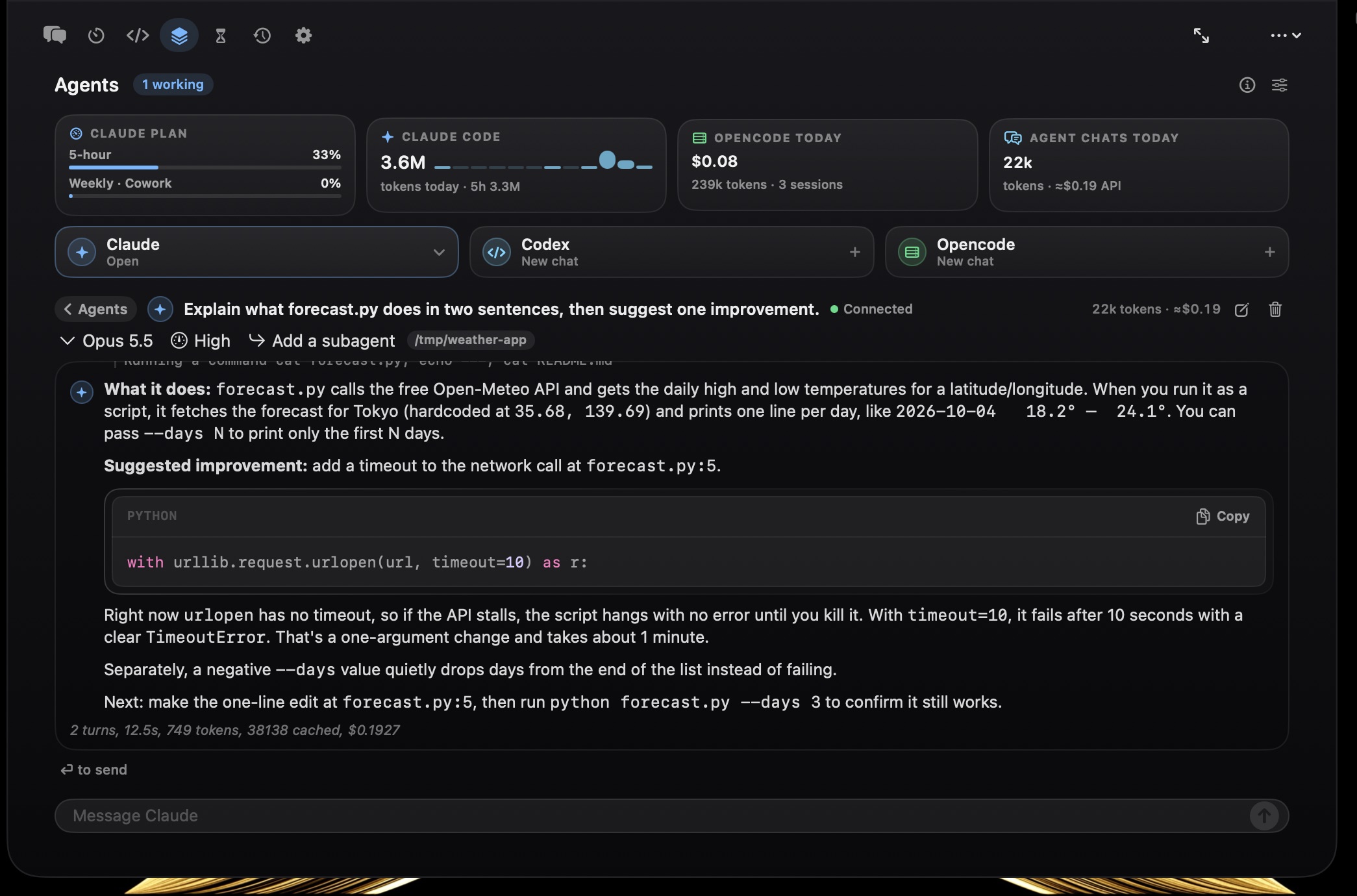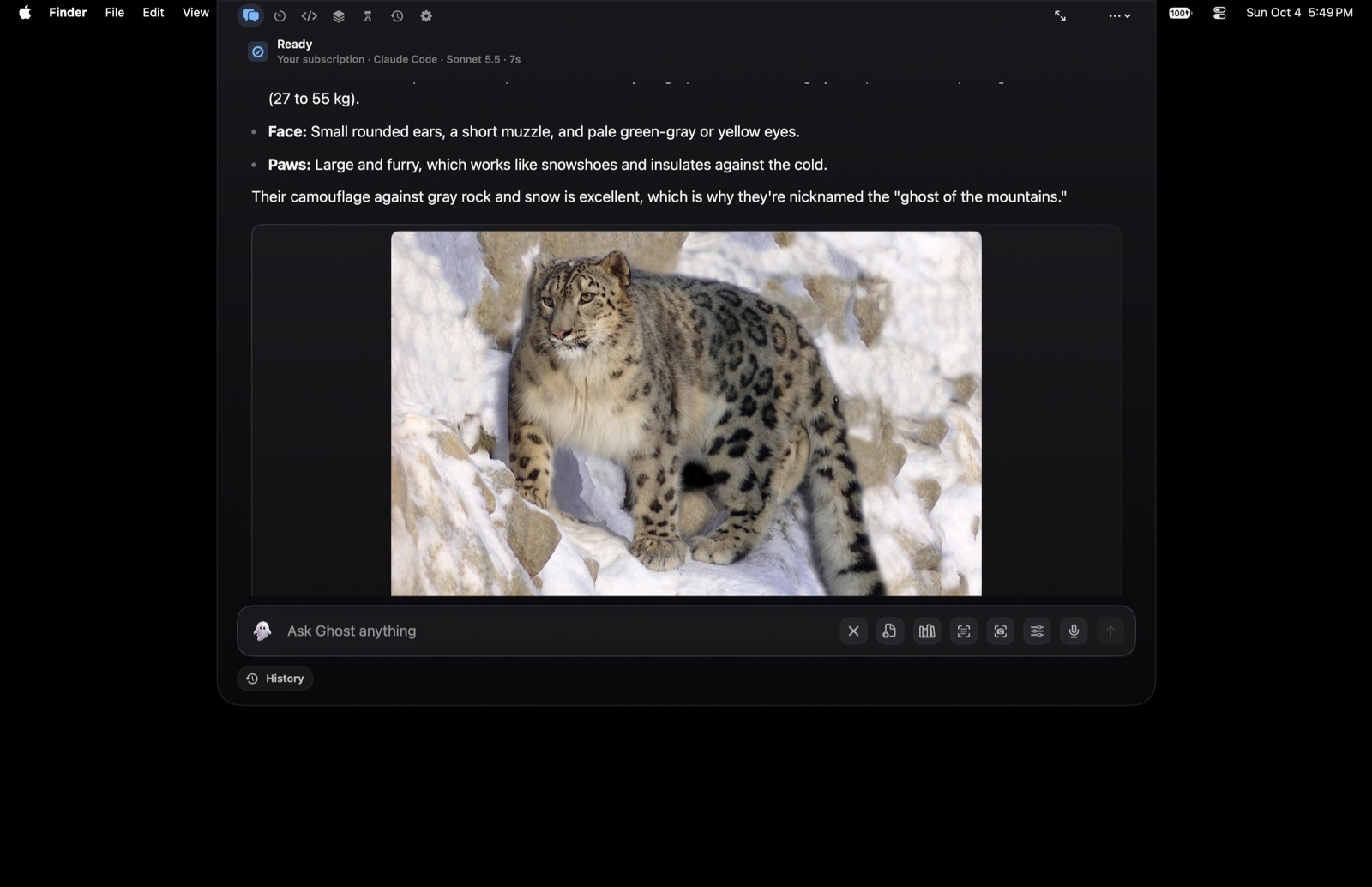
Menu bar
Click the ghost in your menu bar to toggle the notch. Right-click for a context menu: New Chat, Agent Console, Usage & Cost, Check for Updates, Quit.
Ghost routes prompts to local and hosted models, searches your private knowledge base, starts local timers, and runs verified Mac actions — all from one quiet, native notch that appears the moment you need it and vanishes when you don't.
Ghost is a native SwiftUI menu-bar app for macOS that connects local models, hosted APIs, optional agent CLIs, document retrieval, timers, and verified Mac actions through one quiet notch-first surface.
It runs as an accessory — no Dock icon, no full-screen takeover. It appears with a keystroke, does the work, and steps back. Your Mac stays your Mac.
Every capability starts off. You opt into each one — clipboard, web, files, automation, screen, shell — in a six-step onboarding. Nothing is on by default. Nothing runs in the background without you asking.
Ghost lives in the menu bar and answers to global shortcuts that work across every app on your Mac. No Accessibility permission required — the hotkeys are registered through Carbon, the same system Spotlight uses.
Click the ghost in your menu bar to toggle the notch. Right-click for a context menu: New Chat, Agent Console, Usage & Cost, Check for Updates, Quit.
Press Option+Space from anywhere to open the
top-center Ghost notch. Configurable to ⌘⇧Space,
⌃Space, ⌃⌥Space, or ⌘⌥G.
A compact quick-ask surface reuses the same routing, tool harness, deterministic parsers, and streaming pipeline for one-off questions from the active screen.
One hub to switch provider and effort, insert saved prompts, run quick actions, and jump to destinations — fully keyboard-driven.
ghost://toggle opens Ghost from any app or
script. No file paths or user content accepted — the link only
ever opens, never exfiltrates.
Right-click any text in any app → Services → Ghost for Rewrite Professionally, Rewrite Casually, Check Grammar, or Ask Ghost for Feedback.
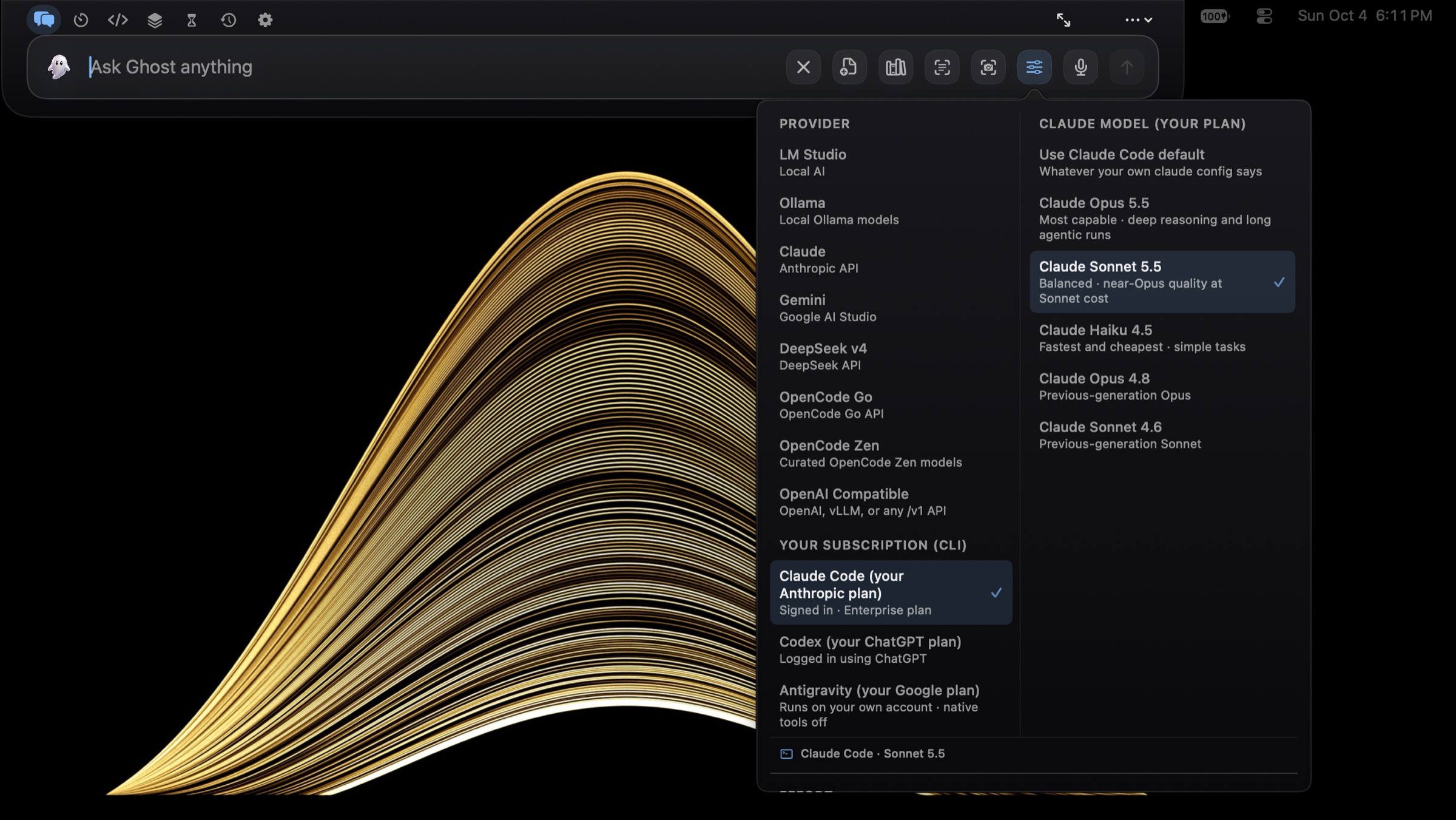
You ask naturally. Ghost scores the prompt, picks the provider, model, and engine, and decides whether a fast direct call is enough or whether the work needs a connected agent loop.
The default path. Ghost calls the provider's HTTP API directly with its native tool harness — streaming, tool loops, prompt caching on Claude, retry with backoff on transient failures.
For deeper work, Ghost shells out to a local CLI at
~/.local/bin/ghost or hermes, passing
provider, model, turn limits, approval mode, and toolsets.
localhost:1234
localhost:11434
Anthropic
v4 reasoning
zen/go/v1
free tier models
Four effort levels control how many turns and tokens a run may spend — from a one-shot answer to a ninety-turn deep work session.
Read-only tools auto-run; medium and high risk ask first.
Low and medium auto-run; high risk still asks.
Everything classified runs — but file path scope never expands.
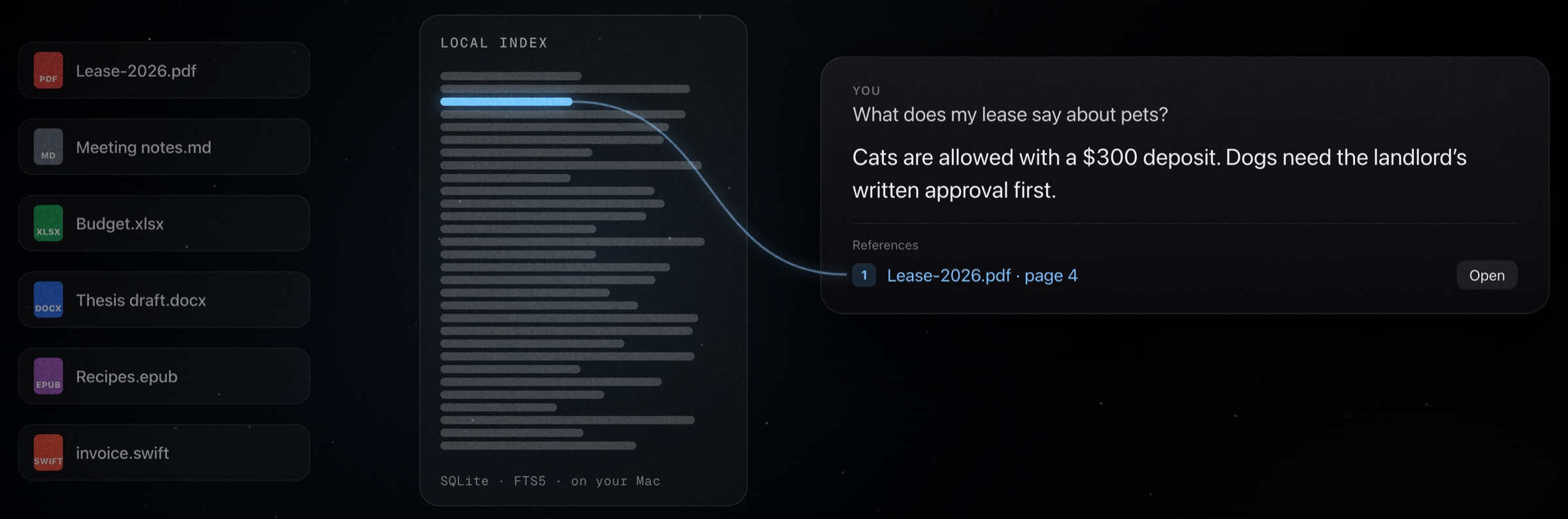
Ghost indexes the folders you approve into a local SQLite database with FTS5 full-text search. When a prompt needs context, it retrieves cited, source-backed chunks — not vague confidence.
Chunks live in
~/Library/Application
Support/Ghost/rag/ghost_rag.sqlite. Max chunk 3,500 chars, 500-char overlap, sentence-aware
splitting, page numbers preserved from PDFs, section titles from
markdown headings.
Watch a folder recursively. Startup sync, event-driven sync with
8-second debounce, periodic rescan every hour. Up to 50,000
files per pass. Skips node_modules,
build, __pycache__, venv,
and the rest.
RAG queries return chunk metadata and source paths. Ghost can open the cited file at the right spot, or reveal it in Finder. Ten RAG tools: ingest, sync, query, search, open, status, remove, reindex, clear.
The capability harness is Ghost's action layer. The model never touches the filesystem directly — it asks, Ghost normalizes the path, checks permissions, runs app-owned code, and returns a machine-readable receipt. You see what actually happened.
List, glob, grep, read, write, create, edit, patch, move, copy, delete (trash by default), zip, reveal in Finder. Conversions between PDF, DOCX, HTML, TXT, and Markdown. Desktop, Downloads, Documents, Ghost Outputs, and the workspace are all safe output targets.
Create Markdown, HTML, TXT, CSV, JSON, PDF, DOCX, PPTX, and XLSX — all through native macOS frameworks. If a local model returns a usable code block instead of calling a file tool, Ghost can save the artifact itself and return the real path.
Read-only: search, list, read, grep, weather, web search.
Writes, creates, calendar, reminders, file copy, app launch.
Patches, moves, deletes, app quit, Shortcuts, shell, index clear.
Unknown future tools fail closed — never silently run.
Every write, edit, move, and delete records before-and-after state. Up to 100 journal entries. If a run goes sideways, you can roll it back.
Ghost doesn't shell out to scripts when it doesn't have to. It talks to Calendar, Reminders, Notes, Shortcuts, Vision OCR, and Speech Recognition through the same native APIs your other apps do.
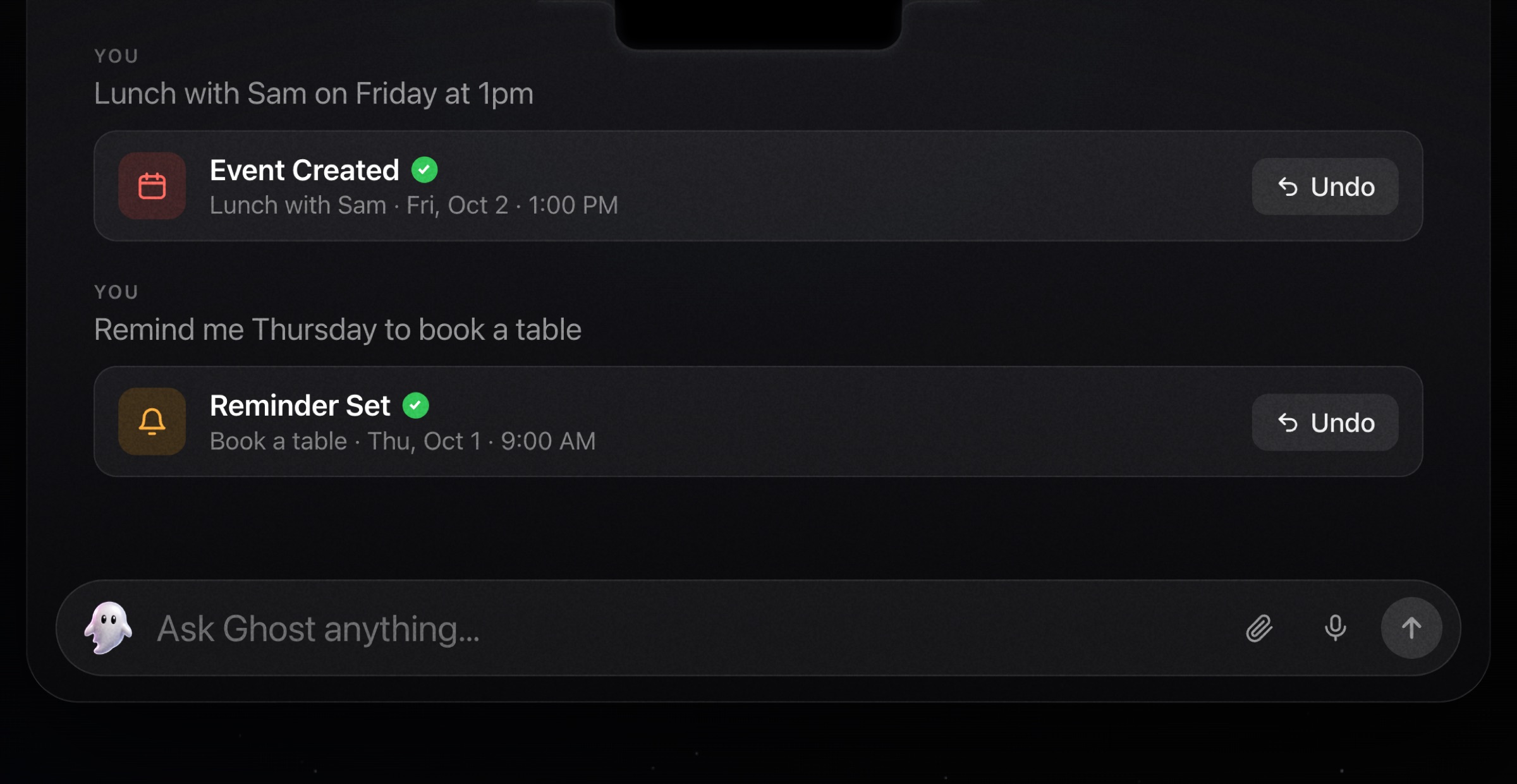
Query events in a date range and create new ones after explicit intent. A deterministic parser turns natural language into real calendar entries.
Turn "remind me to check the oven in 10 minutes" into a real macOS Reminder with a due date — parsed deterministically from your sentence.
Create notes in specified folders, append to existing ones, and search by title and content — all through AppleScript.
On-device SFSpeechRecognizer with a live
three-bar EQ waveform driven by RMS from the audio tap. Start,
stop, send — or press Space to toggle.
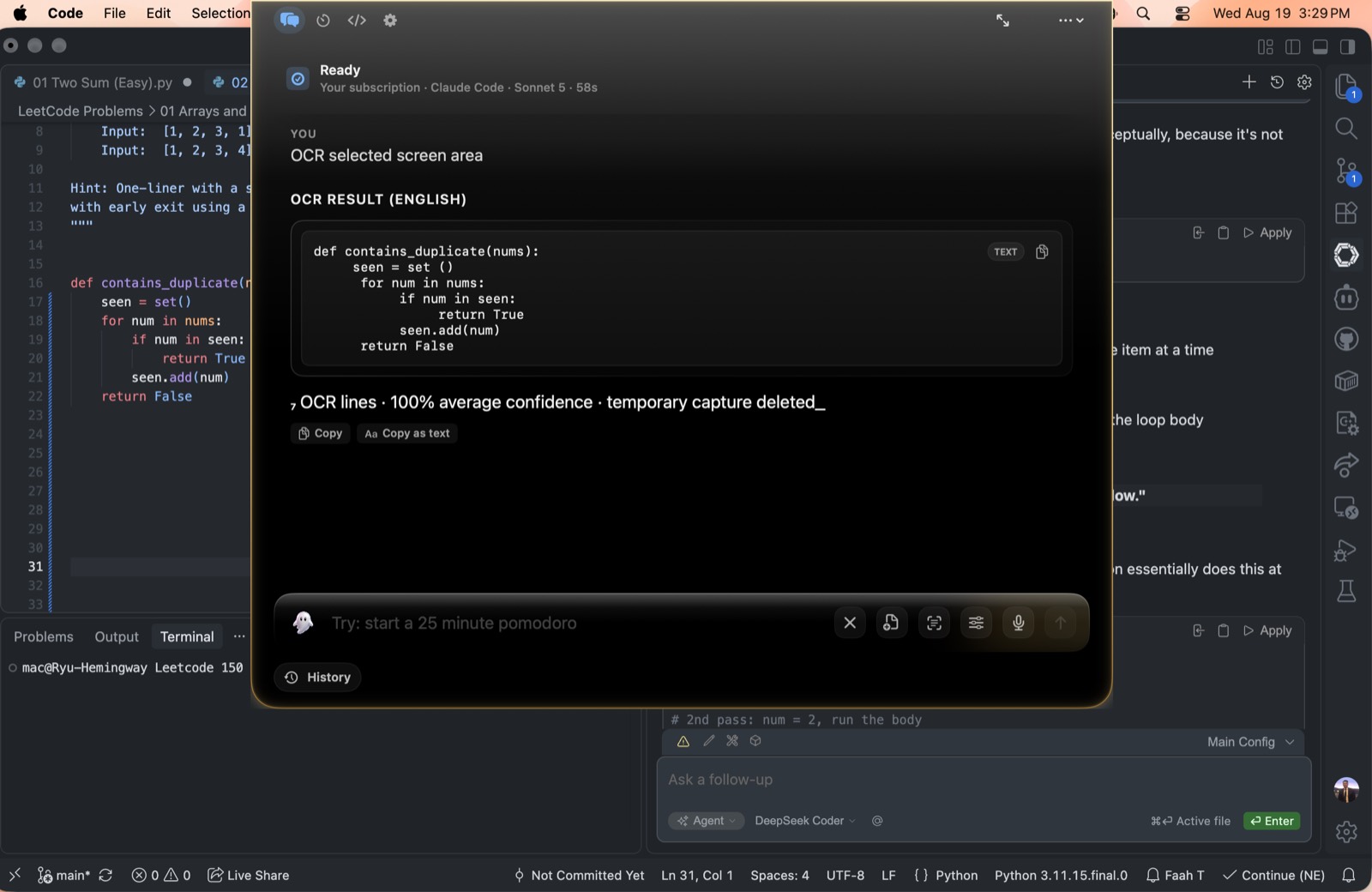
Capture a region and extract text with Apple Vision OCR — fast or accurate mode. Ghost hides during capture and restores afterward.
Run macOS Shortcuts through /usr/bin/shortcuts.
Set pomodoro and countdown timers in natural language. Active
timers take over the compact notch, and completed timers reopen
with pause, resume, add-time, restart, and dismiss controls.
When a compact notch isn't enough, Ghost opens into deeper work modes — agent workflows, an in-app terminal, an intent router that classifies prompts before they run, and a local model capability probe that picks the safest calling convention.
Inspect & propose
Edit files & run commands
Read & map codebase
Inspect diffs & catch bugs
Live progress in the notch, including creating-file and using-tools states.
Open with ⌘⇧T. Slash commands \clear,
\model, \help. An activity timeline
with live streaming output.
Classifies prompts into Answer, Research, Files, Summarize, Screenshot, Clipboard, Create Artifact, Organize, Automation, Code, Debug, Review, Shell — then detects filenames, save targets, and RAG references before routing.
Probes LM Studio and Ollama models for chat, JSON mode, native
tool calls, and argument accuracy — then recommends
native_tool_calls, json_action_mode,
harness_first, or answer_only.
Privacy isn't a setting you find later. It's the architecture. Ghost separates local providers, local indexes, and hosted key paths — so where your data goes is a routing choice, not an afterthought.
API keys live in macOS Keychain. A legacy
~/.ghost/.env file is migrated transparently and
deleted. Keys are only read when their provider is actually
called — no Keychain prompts at launch.
Environment scrubbing ensures the agent process only sees the selected provider's keys. DeepSeek keys are blocked when any other provider is selected. Local providers can't launch agent mode at all.
Web fetches block localhost, private IPv4/IPv6, link-local, multicast, and reserved addresses. DNS resolution checks every address. Redirects to private destinations are blocked. Cookie-free, cache-free, 5MB max.
Even with Full Disk Access, paths like .ssh,
.gnupg, .aws,
login.keychain, .kube/config, and
.env require explicit consent — Allow Once, Always
This Session, or Deny.
Web, local files, Mac automation, screen capture, and terminal inspection are each toggled independently. Disabled capabilities are removed from model tool schemas and checked again before execution. Revoking cancels active work mid-flight.
ghost://toggleThe only deep link Ghost accepts is one that opens Ghost. No file paths, no user content, no exfiltration vectors. Older deep link patterns are blocked.
Ghost's interface is built on a "Cosmic Glass" design system —
NSVisualEffectView blur with a subtle noise layer,
and an aurora background that shifts hue with the tone of your
conversation.
The notch condenses into view with scale, blur, and a soft bloom — plus a trackpad haptic. A gentle haptic marks answer completion. Welcome-back confetti fires once a day from the logo.
Hollow when the composer is empty, primary accent when ready, red stop button while a run is in flight. Answer blocks ease in from a soft blur.
Tabular numerals, a latency sparkline, a token counter with rolling number animation, a reasoning depth meter, and skeleton loaders instead of spinners.
Open with ⌘⇧U. Today, 7-day, and 30-day spend, a
30-day sparkline, per-model breakdown, and a recent activity log
— with cost approximated from a per-model rate table.
Right-click any message for a circular menu — Copy, Regenerate, Fork, Pin, Copy ID, Delete — with champagne highlight on the active item and red on destructive. A native NSMenu sits underneath for keyboard and VoiceOver.
The compact notch stays small for quick asks, expands for transcripts and settings, and hands deeper work to larger app surfaces when a task needs more room.
All motion respects prefers-reduced-motion.
VoiceOver support through native menus. Full keyboard navigation
in the command palette. Reduce Motion is honored throughout.
Ghost is open source, native macOS, and runs as a menu-bar app you summon with a keystroke.